If you’re planning to become a software developer, data scientist, DevOps engineer, AI engineer, or even a technical writer, you’ve probably heard of GitHub. It is one of the most important platforms in modern software development and is used by millions of developers, companies, and open-source communities around the world.
GitHub is much more than a place to store code. It is a collaboration platform that enables developers to work together on projects, track every change, manage bugs, review code, automate software delivery, and contribute to open-source software. Whether you’re building a personal website, a mobile app, or an enterprise application, GitHub provides the tools to organize and manage your work efficiently.
In this comprehensive guide, you’ll learn what GitHub is, how it works, its key features, how to create an account, how to use it effectively, its advantages and disadvantages, and answers to frequently asked questions.
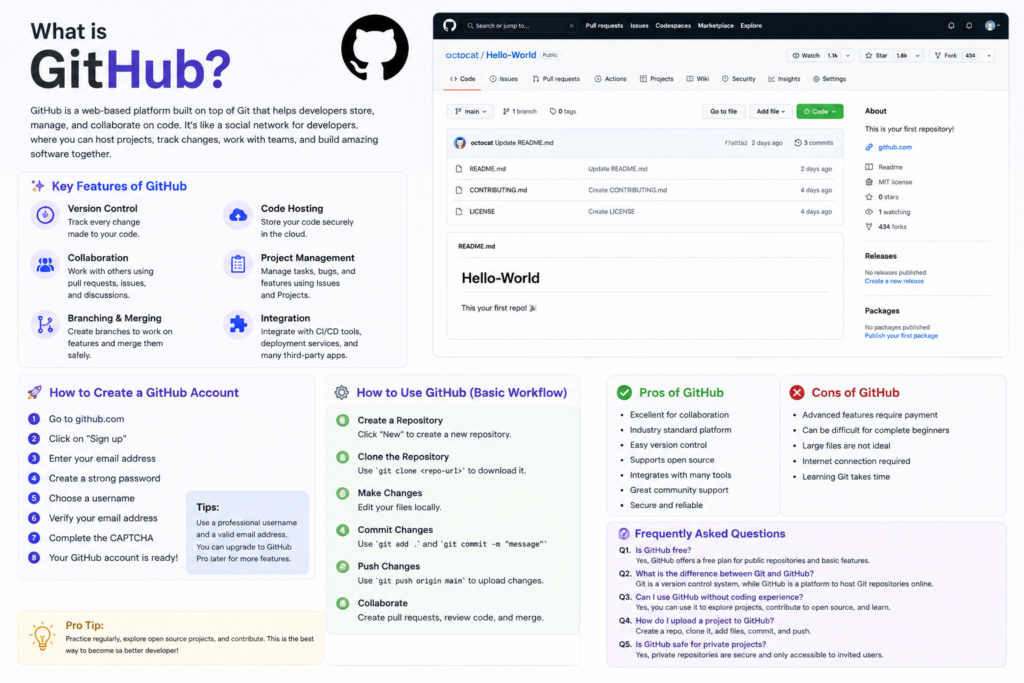
What Is GitHub?
GitHub is a cloud-based platform built around Git, the world’s most popular version control system.
Git helps developers keep track of changes made to their code over time, while GitHub provides an online platform where Git repositories can be stored, shared, and managed.
Think of Git as the engine that tracks changes, and GitHub as the garage where your projects are stored and where teams collaborate.
GitHub allows developers to:
- Store source code
- Track changes
- Collaborate with team members
- Review code
- Report and fix bugs
- Automate testing and deployment
- Manage software projects
- Share open-source projects with the world
Today, GitHub hosts hundreds of millions of repositories and is widely used by startups, enterprises, educational institutions, and individual developers.
Why Is GitHub Important?
Before GitHub became popular, collaborating on software projects was significantly more difficult. Developers often shared files manually through email or file-sharing services, making it hard to know which version was the latest.
GitHub solved this problem by introducing centralized collaboration while still allowing distributed version control through Git.
Some of the biggest benefits include:
- Every code change is tracked.
- Teams can work simultaneously without overwriting each other’s work.
- Previous versions of code can be restored if needed.
- Code reviews improve software quality.
- Open-source collaboration becomes simple.
Key Features of GitHub
1. Git Repositories
A repository (or “repo”) is a storage space for your project’s files, source code, documentation, and history.
Each repository keeps a complete record of every change made to the project.
2. Version Control
Version control allows developers to save snapshots of their work over time.
Benefits include:
- Undo mistakes
- Compare versions
- Restore previous code
- Track who made changes
- Maintain project history
3. Branching
Branches allow developers to work on new features or bug fixes without affecting the main codebase.
Common branches include:
- Main
- Development
- Feature branches
- Release branches
- Hotfix branches
Branching makes parallel development safe and organized.
4. Pull Requests
A Pull Request (PR) is a request to merge code changes from one branch into another.
Before merging, team members can:
- Review code
- Suggest improvements
- Discuss implementation
- Run automated tests
- Approve or reject changes
Pull requests are one of GitHub’s most valuable collaboration features.
5. Issues
GitHub Issues help teams manage tasks and bugs.
You can use issues to:
- Report bugs
- Suggest new features
- Track improvements
- Assign work
- Set priorities
- Monitor progress
6. GitHub Actions
GitHub Actions is an automation platform built into GitHub.
It can automatically:
- Run tests
- Build applications
- Deploy websites
- Publish packages
- Send notifications
- Perform security scans
This enables Continuous Integration and Continuous Deployment (CI/CD).
7. Discussions
GitHub Discussions provides a dedicated space for conversations, questions, announcements, and community engagement without cluttering issue trackers.
8. Wikis
Many repositories include a Wiki where teams can maintain documentation, tutorials, project guidelines, and technical references.
9. Projects
GitHub Projects offers Kanban-style boards for planning and tracking work.
Teams can:
- Create task boards
- Organize milestones
- Prioritize work
- Track progress visually
10. Security Features
GitHub includes tools to improve software security, such as:
- Secret scanning
- Dependency alerts
- Vulnerability detection
- Security advisories
- Code scanning
These features help developers identify and fix potential risks earlier in the development process.
How to Create a GitHub Account
Creating a GitHub account is straightforward.
Step 1
Visit the GitHub website and click Sign up.
Step 2
Enter:
- Email address
- Password
- Username
Choose a username that is professional, as it often becomes part of your developer portfolio.
Step 3
Verify your email address.
Step 4
Complete any required verification steps.
Step 5
Select a free or paid plan based on your needs.
Step 6
Complete the setup process by choosing your interests or skipping optional personalization.
Once finished, you can create repositories, contribute to projects, and collaborate with other developers.
How to Use GitHub
After creating an account, you’ll typically follow this workflow:
Create a Repository
Repositories store your project files.
You can choose:
- Public repository
- Private repository
Include a README file to describe your project.
Clone the Repository
Clone the repository to your local computer using Git so you can work on it offline.
Make Changes
Edit or add files using your preferred code editor.
Commit Your Changes
A commit records a set of changes along with a descriptive message explaining what was modified.
Examples:
- Added login feature
- Fixed navigation bug
- Updated documentation
Push Changes
Push uploads your committed changes to the remote GitHub repository.
Create a Pull Request
If you’re working on a branch, open a pull request so teammates can review your work before merging.
Merge Changes
Once approved, merge the branch into the main branch.
Common GitHub Terms
Understanding these terms will help you get started quickly.
- Repository: A project’s storage location.
- Commit: A saved snapshot of changes.
- Branch: An independent line of development.
- Merge: Combining changes from one branch into another.
- Clone: Copying a repository to your computer.
- Fork: Creating your own copy of another repository.
- Pull Request: Request to merge changes.
- README: Documentation describing the project.
- Issue: A task, bug, or enhancement request.
- Release: A packaged version of the software.
Advantages of GitHub
GitHub offers numerous benefits for individuals and organizations.
Excellent Collaboration
Multiple developers can work together efficiently.
Reliable Version Control
Every change is recorded and recoverable.
Open-Source Community
Developers can contribute to projects used worldwide.
Portfolio Building
Public repositories showcase your coding skills to recruiters and employers.
Automation
GitHub Actions simplifies testing and deployment.
Integration
GitHub integrates with many development tools, including IDEs, CI/CD platforms, and cloud services.
Community Learning
Reading other developers’ code is an excellent way to improve your skills.
Disadvantages of GitHub
While GitHub is powerful, it has some limitations.
Learning Curve
Beginners may find Git commands challenging initially.
Internet Dependency
Although Git works locally, collaboration through GitHub requires internet access.
Large Binary Files
Git repositories are optimized for source code, not large media files.
Advanced Enterprise Features
Some advanced collaboration and security features are available only on higher-tier plans.
Best Practices for Using GitHub
- Write meaningful commit messages.
- Use branches for new features.
- Keep your README updated.
- Review pull requests carefully.
- Document your code.
- Avoid committing sensitive information.
- Organize repositories clearly.
- Use
.gitignoreto exclude unnecessary files. - Enable two-factor authentication for better account security.
- Contribute to open-source projects to gain experience.
Frequently Asked Questions
Is GitHub free?
Yes. GitHub offers a free plan with unlimited public and private repositories, along with paid plans that provide additional collaboration, security, and enterprise features.
What’s the difference between Git and GitHub?
Git is a version control system that tracks changes locally on your computer. GitHub is a cloud-based platform that hosts Git repositories and adds collaboration, project management, code review, and automation features.
Do I need to know Git before using GitHub?
A basic understanding of Git commands is very helpful because GitHub is built around Git. However, many common tasks can also be performed using GitHub’s web interface.
Can I use GitHub without programming?
Yes. GitHub can be used for documentation, books, research projects, notes, websites, and other files that benefit from version control and collaboration.
Is GitHub safe?
GitHub includes strong security features, but users should still follow best practices such as using strong passwords, enabling two-factor authentication, and avoiding storing sensitive secrets directly in repositories.
What is a Fork?
A fork creates your own copy of another person’s repository, allowing you to experiment or contribute without affecting the original project.
What is GitHub Actions?
GitHub Actions is GitHub’s automation platform that helps automate testing, building, and deployment using customizable workflows.
Why do companies use GitHub?
Companies use GitHub to collaborate on code, manage projects, review changes, automate software delivery, track issues, and maintain secure, version-controlled repositories.
GitHub has become an essential platform for modern software development. Whether you’re an aspiring developer creating your first portfolio, a student collaborating on a university project, or an enterprise team managing thousands of repositories, GitHub provides the tools needed to build software efficiently and collaboratively.
Learning GitHub not only improves your technical skills but also helps you adopt industry-standard development practices. By mastering repositories, branches, commits, pull requests, and automation, you’ll be well prepared for real-world software development and open-source contributions.
If you’re just getting started, begin with a simple project, explore public repositories, and practice making commits and pull requests. With consistent use, GitHub will become one of the most valuable tools in your development toolkit.